For adult social care teams that receive hospital referrals
Turn a hospital discharge into one verified referral, without anyone retyping it.
Doti reads the documents the ward sends, fills in the referral your workflow needs, and shows the line each answer came from. A named person on your team checks it before anything is sent.
In live trial with Newport City Council Adult Services.
doti · Newport City Council Adult Services · Referral queue
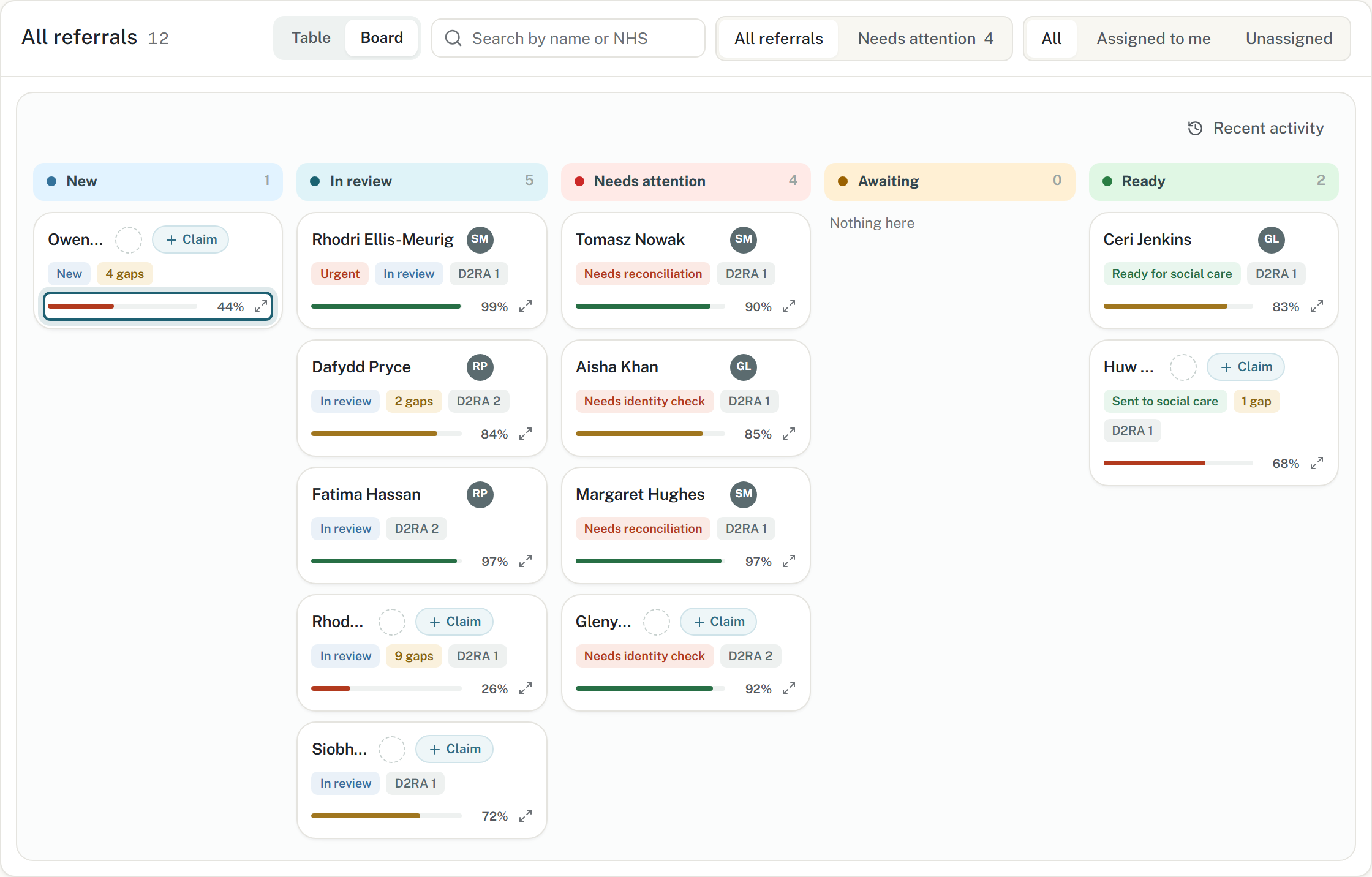
How complete each referral is
Live trial · Newport City Council
Aligned to the PRSB hospital referral standard
English and Welsh
WCAG 2.1 AA, audited
The problem
Why the referral arrives incomplete
A typical discharge arrives as a discharge summary, a medication chart, a treatment escalation plan and a care plan, written by four different people for four different purposes. Someone on your team reads all of it and retypes what they can find into your own forms. Whatever they miss turns into a delayed discharge or an assessment done twice.
What arrives
Discharge summaryWard C3 · Cardiology
Medication chartPharmacy · dose changed on discharge
Treatment escalation planReSPECT · handwritten
Care planDischarge liaison
What your team gets
One verified referral
Every field, with its source37 fields
Matched to your recordconfirmed
Checked against the standardPRSB
Signed off bya named person
Two and a half minutes
Watch a referral go from four documents to signed off
Recorded on the live trial instance. All patient data shown is synthetic.
How it works
How a referral moves through Doti
Doti sits at the receiving end, in the council's team. The AI reads the documents and drafts the referral. A named practitioner checks the draft at step 3 and signs it off at step 7. Nothing goes to social care on the AI's say-so.
1CapturePDFs, Word files or scans, sent as they are.
2ExtractOnly the fields your workflow asks for.
3VerifyHuman checkpointEach field shown beside the line it came from.
4MatchScored against your records. If it is not sure, it stops.
5ReconcileThe hospital's record compared with yours.
6Gap checkChecked against a fixed ruleset.
7Sign offHuman checkpointA named person signs off and records why.
8OutputYour forms, filled in.
Extract and verify
See where every answer came from
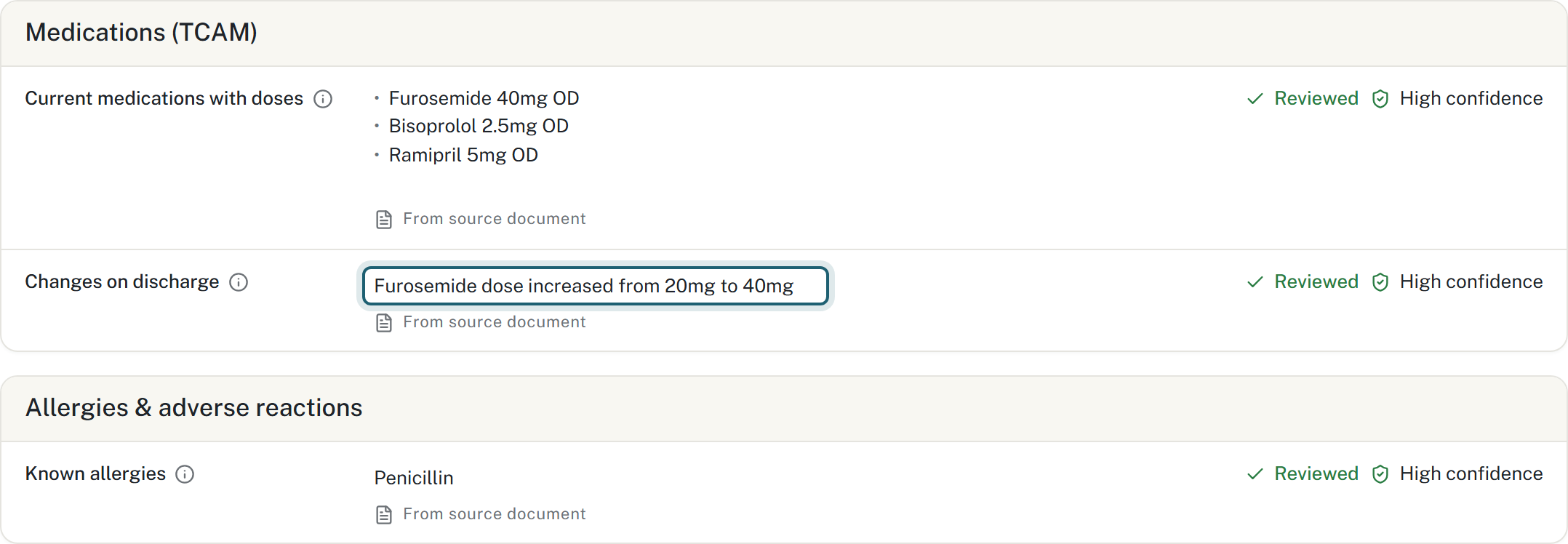
Each filled-in field links to the line on the source page it was taken from, and shows how confident Doti is in it. Your reviewer can check a value in a few seconds instead of reading the whole bundle again. If the documents do not say, the field stays empty and is listed as a gap.
Every check is recorded against the person who made it.
Tomasz Nowak · 2 · Extracted information
The dose that changed on discharge, with its source line
Match and reconcile
Matching the referral to the right person
Doti looks for the person in your own records and shows you the score, what it compared and the thresholds it used. Even a perfect score is not accepted until someone on your team confirms it. Doti then compares the hospital's record with yours, field by field. Where the two disagree, your team chooses which value to keep, and can change that choice at any point before sign-off.
7consistent
22new from health
2to decide
Tomasz Nowak · 5 · Reconciliation
Two fields where the records disagree
Governance
What makes Doti safe to use with patient data
Doti only extracts what your form needs
Doti only asks the AI for the fields on the destination form. Anything without a destination field is never extracted, so it never leaves the source document. You can state that in a DPIA, and the decisions to exclude are logged as well.
A named person signs off every transfer
Every step that matters, from confirming a match to sending the referral, is a decision by a named person. The audit log records who did it, what they did, when, and why.
Your admin sets up new pathways
Your admin sets up the steps, fields, extraction prompts, the lawful purpose for each field and the output documents in Doti's admin studio, in English and Welsh, with versions and publishing. Adding a pathway is configuration work and needs no software change.
Built to the standards you already use
The discharge workflow follows the PRSB hospital referral standard, and the architecture follows NHS England's BaRS pattern of separating payload from transport. Doti is bilingual in English and Welsh, meets WCAG 2.1 AA with an audit showing zero axe-core violations, and runs several organisations on one installation.
Where it applies
Other handovers Doti can run
Hospital discharge to social care is live first. The others below are set up the same way, using the same product.
Hospital discharge to social care
Referral for assessment for community care and support, aligned to PRSB. In trial with Newport City Council.
Justice reception handovers
Health and care information following a person into and out of custody.
Section 117 mental health aftercare
Joint health and social care planning after detention under the Mental Health Act.
Continuing healthcare referrals
Evidence gathering and checklist completion for NHS continuing healthcare.
Safeguarding transfers
Structured, minimum-necessary information sharing when concerns cross organisational lines.
Next step
See Doti working on your pathway
We can show you the whole process on synthetic data, so no real records are involved. Get in touch to arrange a demonstration or to talk about a pilot.